

Cloud computing has become an important part of modern business operations. Organisations are moving away from traditional IT infrastructure towards cloud environments to improve scalability, flexibility, security management and operational efficiency. However, migrating business applications, databases and IT infrastructure requires careful planning and the right approach.
What are the cloud migration types? Cloud migration can involve moving an entire data centre, transferring applications and databases, switching between cloud providers, or adopting a hybrid cloud environment. Businesses can also choose different migration strategies, such as rehosting, replatforming and refactoring, depending on their technical requirements and long-term goals.
Understanding these approaches helps businesses select a suitable migration path while minimizing downtime, managing costs and maintaining business continuity. In this guide, we explore the different types of cloud migration, the 6 Rs migration strategies, their benefits and how businesses can choose the right approach.
What Is Cloud Migration?
Cloud migration is the process of moving an organisation’s digital assets, including applications, databases, files, servers and IT workloads, from an existing infrastructure to a cloud computing environment.
This process commonly involves transferring resources from on-premises data centres to cloud platforms such as Amazon Web Services (AWS), Microsoft Azure or Google Cloud. It can also involve moving applications and data between different cloud providers.
For example, a business operating its applications on local servers might move them to Microsoft Azure to improve infrastructure scalability and reduce the need to maintain physical hardware.
Cloud migration is not limited to transferring data. It may also involve application modernisation, infrastructure configuration, security improvements and ongoing performance optimisation.
Businesses modernising their customer management systems can also benefit from cloud-based CRM adoption. For organisations planning to implement or optimise Salesforce, our Salesforce Implementation Services can help align CRM capabilities with business processes, customer data and operational requirements.
What Are the Different Types of Cloud Migration?
Businesses can choose different types of cloud migration depending on their existing infrastructure, application requirements and business objectives. Here are six common cloud migration scenarios.
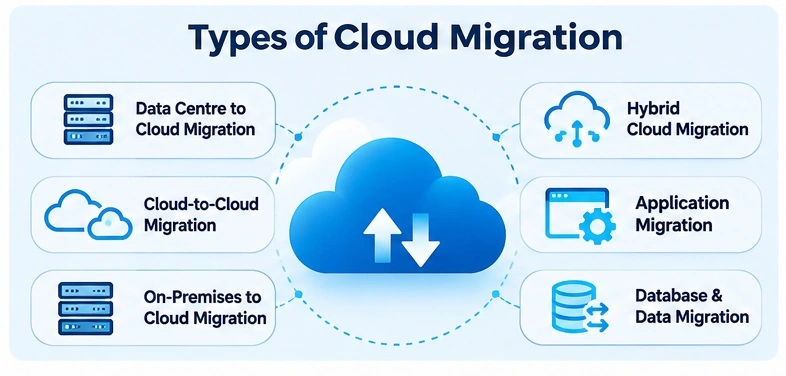
1. Data Centre to Cloud Migration
Data centre migration involves moving an organisation’s IT infrastructure, applications, servers and databases from its existing data centre to a cloud environment.
Businesses often consider this approach when they want to reduce their dependence on physical infrastructure and simplify IT management.
For example, an Australian organisation operating its own data centre might migrate its servers and business applications to AWS or Azure.
When is it suitable?
- Businesses planning to move away from physical data centres.
- Organisations facing increasing hardware maintenance costs.
- Companies looking for scalable computing resources.
- Businesses planning to modernise their IT infrastructure.
2. Cloud-to-Cloud Migration
Cloud-to-cloud migration involves transferring applications, databases or workloads from one cloud provider to another.
For example, a business might move its existing workloads from AWS to Microsoft Azure or from Google Cloud to AWS.
Organisations may consider this approach because of pricing differences, service requirements, compliance needs or access to specific cloud technologies.
When is it suitable?
- Businesses looking to change cloud providers.
- Organisations seeking different cloud capabilities.
- Companies managing increasing cloud infrastructure costs.
- Businesses aiming to reduce dependency on a single cloud provider.
3. On-Premises to Cloud Migration
On-premises to cloud migration involves moving applications, databases, servers and other IT resources from locally managed infrastructure to a cloud platform.
Unlike a complete data centre migration, businesses can migrate selected workloads instead of moving their entire IT environment at once.
For example, a company might move its customer database and internal applications to Azure while keeping some systems on its existing servers.
When is it suitable?
- Small and medium-sized businesses upgrading their IT infrastructure.
- Companies managing applications on outdated servers.
- Organisations looking for remote infrastructure access.
- Businesses that want to reduce hardware maintenance responsibilities.
4. Hybrid Cloud Migration
Hybrid cloud migration involves moving selected workloads to the cloud while keeping other applications and data within existing on-premises infrastructure.
This approach allows businesses to operate across both environments while maintaining control over specific systems and sensitive workloads.
For example, a financial organisation might keep certain regulated systems within its existing infrastructure while using cloud platforms for data analytics and application hosting.
When is it suitable?
- Businesses with existing infrastructure investments.
- Organisations with specific data residency or compliance requirements.
- Companies that need a gradual cloud transition.
- Businesses running applications with different infrastructure requirements.
5. Application Migration
Application migration focuses on moving business software and applications from existing infrastructure to a cloud environment.
Depending on the application’s architecture, businesses may move it without major changes or modify its code to take advantage of cloud-native capabilities.
For example, an organisation might migrate its internal business application to AWS to improve accessibility, scalability and infrastructure management.
Application migration requires careful assessment of software compatibility, application dependencies, integrations and security requirements.
When is it suitable?
- Businesses running applications on outdated infrastructure.
- Organisations looking to modernise legacy applications.
- Companies requiring better application scalability.
- Businesses planning to adopt cloud-based software solutions.
6. Database and Data Migration
Database and data migration involves transferring business information, databases and storage systems from existing infrastructure to cloud-based environments.
Businesses may move customer records, financial information, operational data and application databases to managed cloud database services.
For example, an organisation might migrate its existing database to Amazon RDS or Azure SQL Database to simplify database management and improve scalability.
Data migration requires proper planning to maintain data accuracy, integrity, security and availability throughout the process.
When is it suitable?
- Businesses managing large volumes of data.
- Organisations upgrading legacy database systems.
- Companies requiring scalable data storage.
- Businesses adopting cloud-based analytics and reporting tools.
What Are the 6 Rs of Cloud Migration Strategies?
The 6 Rs of cloud migration refer to six commonly recognised approaches businesses can use when deciding how to move or manage their existing applications and workloads.
These strategies help organisations evaluate which applications should be moved, modernised, replaced, retained or removed.
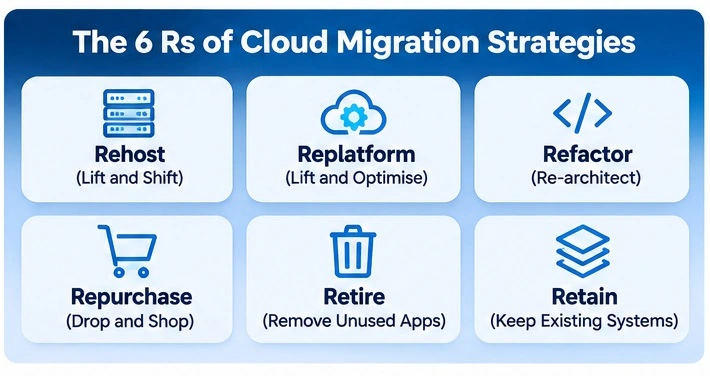
1. Rehost (Lift and Shift)
Rehosting involves moving existing applications and workloads to a cloud environment without making significant changes to their architecture.
For example, a business can move its existing virtual machines from an on-premises server to AWS or Azure.
Best for: Businesses looking for a relatively quick migration with minimal application modifications.
2. Replatform (Lift and Optimise)
Replatforming involves making limited changes to an application or its infrastructure before moving it to the cloud.
These changes help businesses benefit from cloud services without completely rebuilding their applications.
For example, an organisation might move its database to a managed cloud database service while keeping most of its application code unchanged.
Best for: Organisations looking to improve performance and infrastructure management without extensive redevelopment.
3. Refactor (Re-architect)
Refactoring involves making significant changes to an application’s code or architecture to take advantage of cloud-native technologies.
This may include adopting microservices, containers, serverless computing or automated deployment processes.
For example, a business might transform a traditional application into a cloud-native application that can scale individual components independently.
Best for: Businesses looking for long-term application modernisation, improved scalability and greater flexibility.
4. Repurchase (Drop and Shop)
Repurchasing involves replacing an existing application with a different product, often through a Software as a Service (SaaS) solution.
Instead of migrating and maintaining the existing software, businesses adopt an alternative cloud-based application.
For example, a company might replace its locally hosted customer management software with a cloud-based CRM platform.
Best for: Businesses looking to reduce software maintenance and adopt modern business applications.
5. Retire
Retiring involves identifying applications or systems that are no longer required and decommissioning them instead of migrating them to the cloud.
Businesses often discover outdated, duplicated or underused applications during migration assessments.
Removing these systems can reduce infrastructure costs, maintenance requirements and unnecessary complexity.
Best for: Organisations with redundant applications or legacy systems that no longer provide business value.
6. Retain
Retaining involves keeping specific applications or workloads in their existing environment rather than migrating them immediately.
Some systems may have technical dependencies, compliance requirements or business restrictions that make immediate migration unsuitable.
For example, a company might keep a specialised application on its existing infrastructure until a suitable cloud solution becomes available.
Best for: Businesses that need to postpone migration because of technical, operational or regulatory requirements.
Important: The 6 Rs are not the only migration framework. AWS also describes a 7 Rs model that includes Relocate, while Microsoft documents an eight-strategy framework that additionally distinguishes approaches such as Rebuild and Rearchitect. The appropriate framework depends on the cloud provider and migration requirements.
What Are the Different Cloud Deployment Models?
Cloud deployment models describe how cloud infrastructure is organised and accessed. They are different from migration types because they explain where and how cloud resources operate.
1. Public Cloud
Public cloud infrastructure is provided by third-party cloud providers and shared across multiple customers through separate, logically isolated environments.
AWS, Microsoft Azure and Google Cloud are common examples.
2. Private Cloud
Private cloud infrastructure is dedicated to a single organisation. It offers greater control over infrastructure configuration, access and resource management.
It can be hosted within an organisation’s own data centre or through a third-party provider.
3. Hybrid Cloud
Hybrid cloud combines private infrastructure or on-premises systems with public cloud resources.
It allows businesses to distribute workloads according to their performance, security and operational requirements.
4. Multi-Cloud
Multi-cloud involves using services from multiple cloud providers.
For example, a business might use AWS for application hosting and Microsoft Azure for other business workloads.
What Are the Benefits of Cloud Migration for Businesses?
Cloud migration can offer several operational and technical benefits when properly planned and implemented.
Some important benefits include:
- Improved scalability: Businesses can increase or decrease computing resources according to changing workloads.
- Better cost management: Organisations can reduce some hardware, maintenance and infrastructure expenses through suitable cloud resource planning.
- Greater flexibility: Cloud environments allow teams to access applications and resources from different locations.
- Improved business continuity: Cloud backup and disaster recovery capabilities can support business operations during unexpected disruptions.
- Application modernisation: Businesses can adopt modern technologies and improve existing applications.
- Centralised infrastructure management: Cloud platforms provide tools to monitor, manage and optimise IT resources.
- Better innovation opportunities: Organisations can access cloud-based analytics, automation and AI services.
However, these benefits depend on the cloud architecture, security configuration, workload selection and ongoing management.
What Are the Common Challenges of Cloud Migration?
Although cloud migration offers several advantages, businesses may face technical and operational challenges during the transition.
1. Data Security and Compliance
Moving business information to the cloud requires appropriate access controls, encryption, monitoring and security policies. Organisations must also consider applicable Australian privacy and industry compliance requirements.
2. Application Compatibility
Some legacy applications may not work properly in a new cloud environment without configuration changes or redevelopment.
3. Unexpected Migration Costs
Data transfer, storage, licensing, infrastructure configuration and ongoing cloud usage can increase migration costs if they are not properly estimated.
4. Business Downtime
Poor migration planning can interrupt business applications and services. Testing, migration scheduling and rollback planning can help minimise disruptions.
5. Data Loss and Integration Issues
Incomplete data transfers or incompatible systems can affect business operations. Data validation and integration testing are important throughout the migration process.
How Do You Choose the Right Cloud Migration Strategy?
Choosing the right cloud migration strategy requires understanding your existing infrastructure and future business requirements.
Before selecting an approach, consider these factors:
- Assess existing infrastructure: Identify current servers, applications, databases and system dependencies.
- Define business objectives: Determine whether your priority is cost optimisation, scalability, performance or modernisation.
- Evaluate application complexity: Check whether existing applications can move without changes or require redevelopment.
- Consider security and compliance: Understand your data protection, access control and regulatory requirements.
- Calculate migration costs: Estimate infrastructure, licensing, migration and ongoing operational expenses.
- Plan for future growth: Select an approach that supports your organisation’s long-term technology requirements.
Not every application needs the same migration strategy. A business may rehost some applications, refactor others and retain systems that are not ready for migration.
What Is the Cloud Migration Process?
A structured migration process helps businesses move their IT workloads while managing technical risks and operational disruptions.

The typical cloud migration process includes six stages:
- Infrastructure assessment: Review existing IT infrastructure, applications, databases and dependencies.
- Migration planning: Define business objectives, migration priorities, timelines and suitable strategies.
- Cloud platform selection: Choose an appropriate cloud environment based on technical and business requirements.
- Migration preparation: Configure cloud infrastructure, security policies, networks and backup systems.
- Data and application migration: Transfer selected workloads and validate their functionality.
- Testing and optimisation: Monitor performance, resolve issues and optimise cloud resources after migration.
Continuous monitoring and optimisation are important to maintain the performance, security and cost efficiency of the migrated environment.
When Should a Business Consider Cloud Migration?
Cloud migration can be beneficial when existing IT infrastructure no longer supports an organisation’s operational or growth requirements.
Businesses should consider evaluating cloud migration when:
- Existing servers require frequent maintenance or replacement.
- IT infrastructure costs are increasing.
- Applications struggle to handle growing workloads.
- Employees need more flexible access to business applications.
- Legacy systems limit innovation and technology adoption.
- The organisation is planning application modernisation.
- Existing infrastructure cannot efficiently support business expansion.
A detailed infrastructure assessment can help determine whether migration is necessary and which approach offers the most value.
Why Choose Professional Cloud Migration Services?
Successful cloud migration requires more than transferring applications and data. Businesses need a structured approach that considers infrastructure compatibility, application dependencies, security, performance and long-term scalability.
Working with an experienced technology partner can help organisations assess their existing IT environment, select suitable migration strategies and manage the transition with minimal disruption.
Kryptoninc helps businesses approach cloud transformation through infrastructure assessment, migration planning, cloud environment configuration and application modernisation. Explore our Cloud Migration Services to learn how your organisation can plan and manage its cloud migration journey.
Final Thoughts
Understanding the different types of cloud migration helps businesses make informed decisions about their technology infrastructure. Whether an organisation is moving from on-premises servers, switching cloud providers, modernising applications or adopting a hybrid environment, selecting the right migration strategy is essential.
By evaluating existing workloads, business objectives, security requirements and future growth plans, organisations can build a migration approach that supports long-term operational efficiency and digital transformation.